

Laptop manufacturers are increasingly integrating artificial intelligence capabilities into processors, operating systems and productivity applications.
The emergence of dedicated neural processing units, or NPUs, is one of the most important developments.
These specialized components are designed to accelerate selected AI workloads while reducing reliance on conventional processors.
For buyers, the challenge is determining whether these capabilities justify the additional expense.
What Is an AI Laptop?
An AI laptop is a portable computer designed to support artificial intelligence workloads through hardware, software or both.
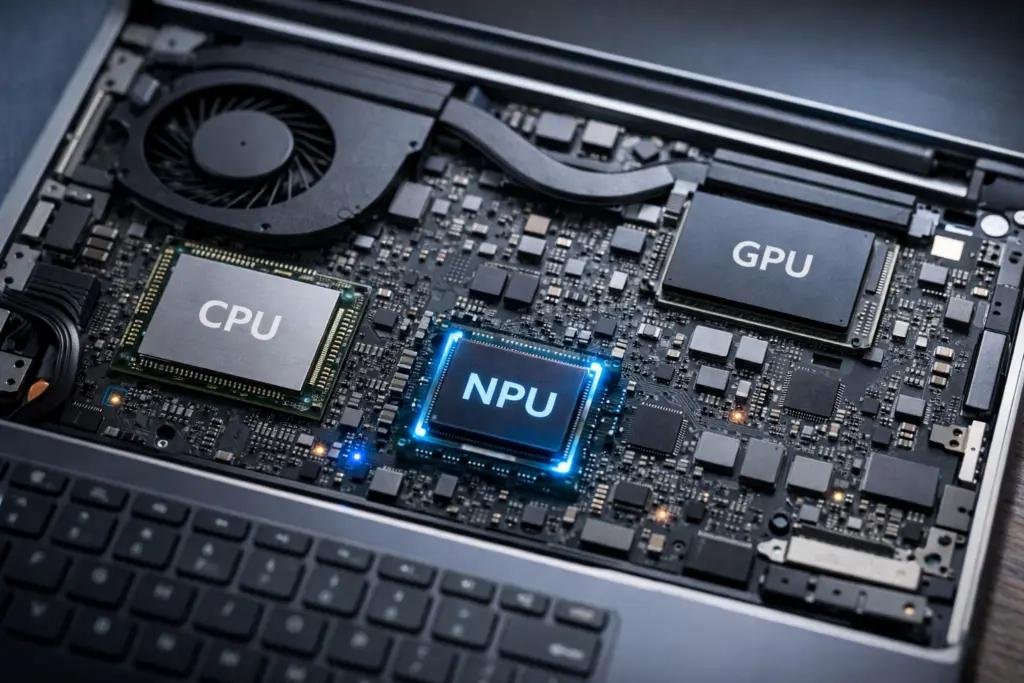
Many modern AI PCs include three principal computing components.
The CPU handles general-purpose computing.
The GPU supports graphics and parallel processing.
The NPU accelerates certain machine-learning tasks.
The exact distribution of work depends on the software and hardware platform.
Why NPUs Matter
Neural processing units are optimized for specific mathematical operations used in machine learning.
They can help run compatible AI features locally, potentially improving efficiency and reducing the need to send some data to cloud servers.
Possible applications include background effects during video calls, speech processing, image enhancement and selected local AI models.
However, an NPU does not automatically make every AI application faster.
Software compatibility is essential.
Understanding TOPS
TOPS stands for trillions of operations per second.
Manufacturers frequently use this measure to describe AI processing capability.
A higher TOPS figure may indicate greater theoretical throughput for supported workloads.
However, TOPS should not be treated as a universal benchmark of real-world performance.
Memory capacity, software optimization, processor architecture and power consumption also matter.
Major AI Laptop Platforms
Intel Core Ultra
Intel’s Core Ultra platform includes processors with AI acceleration capabilities.
Specifications vary by processor generation and model.
AMD Ryzen AI
AMD offers processors with dedicated AI acceleration and integrated graphics options.
Performance and compatibility depend on the selected device.
Qualcomm Snapdragon X
Qualcomm’s Snapdragon X family supports Windows laptops using Arm-based processors.
Buyers should confirm compatibility with essential applications, peripherals and enterprise software.
Apple Silicon
Apple’s Mac processors incorporate neural processing capabilities and operate within the macOS ecosystem.
The best choice depends on the buyer’s software requirements and preferred operating system.
What Specifications Should Buyers Prioritize?
| Component | Buying consideration |
|---|---|
| Processor | Match performance to actual workloads |
| NPU | Check supported AI features and software compatibility |
| RAM | Consider 16GB as a practical starting point for many users |
| Storage | Select adequate SSD capacity |
| Display | Evaluate brightness, resolution and color accuracy |
| Battery | Review independent real-world tests |
| Connectivity | Check ports, Wi-Fi and peripheral compatibility |
| Warranty | Consider service coverage and repairability |
Best AI Laptop for Students
Students should prioritize reliability, battery life, portability and compatibility with academic software.
An expensive high-performance AI laptop may be unnecessary for basic research, writing, presentations and online classes.
A balanced configuration often provides better value.
Students working with coding, design or data analysis may require additional memory and processing capacity.
Best AI Laptop for Business Professionals
Business users should evaluate security, video conferencing, document workflows and enterprise compatibility.
Features such as biometric authentication, device encryption and management support may matter more than raw AI performance.
Organizations should also assess warranty terms and local technical support.
Best AI Laptop for Content Creators
Creative professionals may benefit from powerful GPUs, sufficient RAM, fast storage and color-accurate displays.
AI-assisted editing can accelerate selected tasks, but conventional hardware performance remains important.
Video editing, 3D rendering and complex design workloads may require substantially more computing power than basic office applications.
Should You Buy an AI Laptop in 2026?
An AI laptop may be worthwhile if the buyer needs compatible local AI capabilities, expects to use the device for several years or is replacing an older computer.
However, purchasing solely because a device carries an AI label may offer limited value.
Buyers should evaluate independent benchmarks and verify that the software they intend to use actually benefits from the hardware.
DAO Perspective: The Best AI Laptop Is the One That Fits the Workload
AI hardware represents a meaningful evolution in personal computing.
Nevertheless, the most useful buying criteria remain practical: performance, battery life, compatibility, durability and price.
An AI laptop should be assessed as a complete computing product, not merely by the specifications of its NPU.
Frequently Asked Questions
What is an NPU in a laptop?
An NPU is a specialized processor designed to accelerate certain machine-learning workloads.
Is an AI laptop better than a normal laptop?
It may offer advantages for supported AI tasks, but overall performance depends on the complete hardware configuration.
Is 16GB RAM enough for an AI laptop?
It can be sufficient for many everyday tasks, although demanding local AI workloads may require more memory.
Do AI laptops work without the internet?
Some AI features operate locally, while cloud-dependent applications still require connectivity.
Conclusion
AI-ready laptops are becoming more capable, but purchasing decisions should remain grounded in real requirements.
Buyers who compare software compatibility, processing power, battery performance and long-term usability are more likely to make a worthwhile investment.
Related reading: Explore consumer technology and product developments at ReviewStreet.





Leave a Reply